
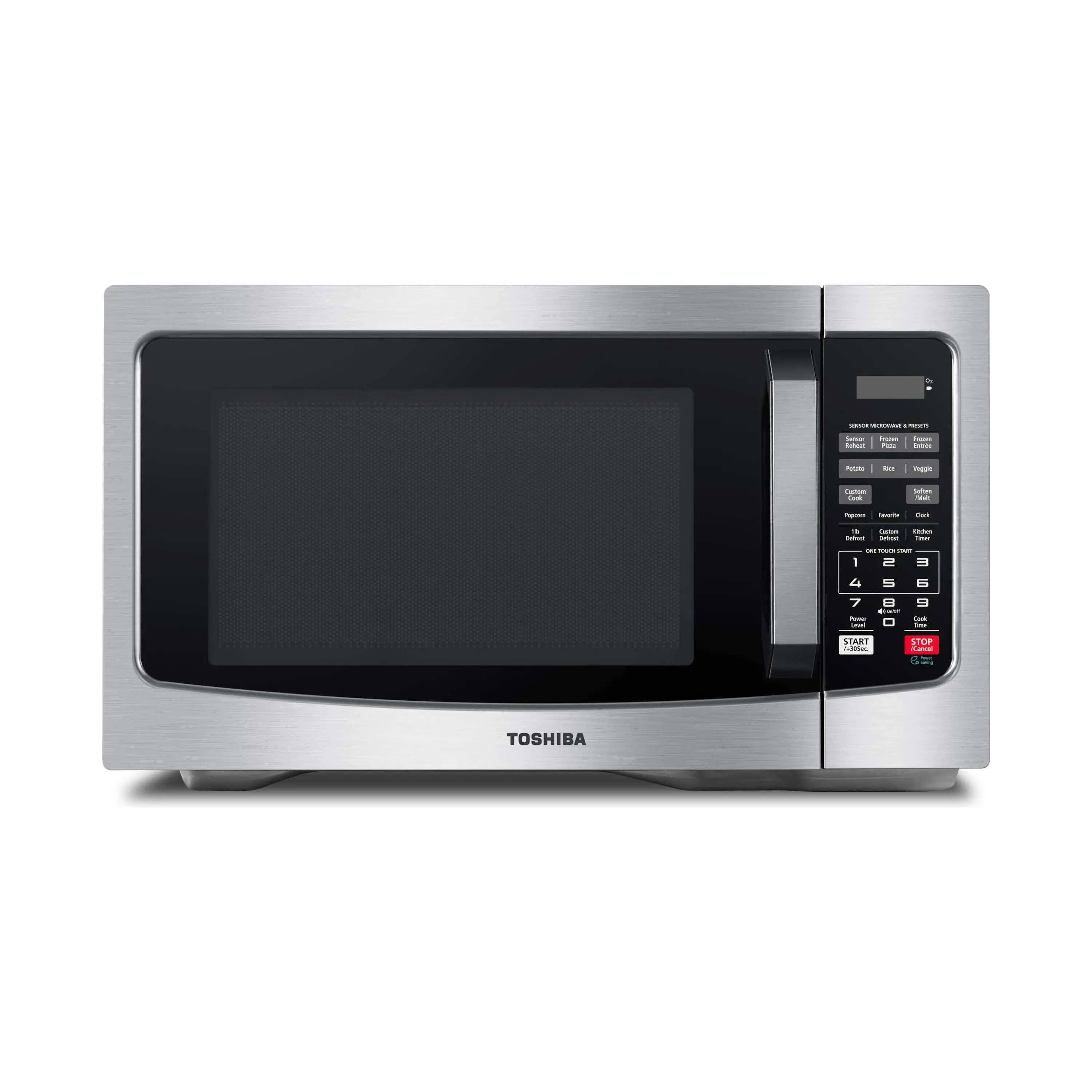
Your needs, this model
Does it fit your priorities?
Is it a good match for plated leftovers?
The documented humidity-sensor reheat function makes it relevant to that routine. Use its food and covering instructions; the sensor menu is not a universal setting for raw, frozen or dry foods.
Explore this need in the finder →Can I choose it just from a 1,100 W listing?
Match the actual unit and supplied manual. Earlier SS/BS instructions rate cooking output at 1,100 W, while a later combined manual gives 1,000 W. The finish suffix alone does not identify the edition.
Explore this need in the finder →Will it fit my tightly measured shelf?
Current maker tables give conflicting exterior dimensions, so this family is not treated as a confirmed match for an exact space limit. Get measurements and ventilation instructions for the actual unit before committing.
Explore this need in the finder →The EM131A5C is a useful candidate for someone who mainly reheats meals, wants a numeric keypad and prefers to silence electronic alerts. Its advertised 1.2 cu. ft. capacity is less important than whether your regular plate rotates freely and the appliance has ventilation space. There is also an unusually consequential version check: the documented 1,100 W edition and a later 1,000 W edition share the EM131A5C-SS and EM131A5C-BS names.
The suffix identifies a finish, not a dependable generation
Toshiba's US pages identify SS as stainless steel and BS as black stainless steel. The earlier exact-model manuals specify 1,100 W cooking output and 1,550 W electrical input at 120 V, 60 Hz. A combined SS/BS manual prepared in August 2024 instead specifies 1,000 W output and 1,600 W input. Input consumption and cooking output are different ratings; neither should be substituted for the other when comparing appliances.
That later book also adds a physical door-opening instruction: lift the release trigger, then pull the handle. The earlier book describes a three-second Stop/Cancel keypad lock, which prevents operation; that is a different function from the mechanical opening step. The later book retains a keypad lock too. Someone replacing an older EM131A5C should therefore inspect the offered handle and rating label, even when ordering the same finish. These manuals do not establish an exact production-date cutoff for every unit. Earlier SS manual; Later combined SS/BS manual.
If lifting a small trigger while pulling would be awkward for your grip, establish which door you will receive before paying. A color choice cannot answer that accessibility question. The discussion below uses the documented 1,100 W edition for its physical specification and detailed operating examples.
Begin with your everyday dish
The earlier manual specifies a 12.4-inch glass turntable. That provides a useful comparison with a dinner plate, but it is not a verified maximum rectangular-container size or door-opening width. Include handles, projecting rims and the cover when measuring a favorite dish. A container that passes through the opening must also clear the cavity throughout rotation. Toshiba requires the tray and ring to remain fitted and the tray to turn without restriction.
This favors someone reheating ordinary plated meals over someone choosing solely for a long casserole. For an unusually shaped dish, confirm the actual usable space rather than calculating fit from 1.2 cubic feet. Nominal volume describes the chamber differently from the dimensions that decide whether your particular food container can move inside it.
It needs more counter space than its closed body suggests
The 1,100 W manual prints external dimensions of 20.5 × 17.1 × 12.8 inches. Toshiba's current product pages give competing dimension sets, including a width/depth/height entry of 20.5 × 17.2 × 12.8 inches and another of 20.6 inches wide, 16 inches deep and 11.8 inches high. Those differences make measuring the offered edition essential for a tight opening; this family name does not justify one universal footprint. Toshiba SS product page.
The installation directions require three inches at each side and above, one inch behind, a level surface and a minimum installation height of three feet. Keep the feet fitted and vents clear. This is a countertop installation, with no permission here to substitute an enclosed cabinet or improvised trim kit. It must not sit over a range or another heat-producing appliance. Allow additional room to operate the door and handle a hot dish.
Sensor Reheat helps with a particular kind of leftover
The sensor is the most relevant convenience if your regular job is reheating a moist meal rather than entering a familiar number of seconds. The earlier chart assigns Sensor Reheat an 8–32 oz range. It excludes bread and other dry foods, raw food, beverages and frozen food from that particular reheat method; separate sensor choices address frozen pizza and entrées. These are distinct routines, rather than one button that identifies anything placed inside.
The manual calls for dry utensils and cavity surfaces, a vented cover where used, and leaving the door closed until sensing finishes and the countdown appears. After that point, stirring or turning is permitted. Someone who habitually opens the door immediately to check progress will need to change that habit. Sensor control reduces one setting decision; it does not remove arranging food, following portions or checking the finished meal.
The keypad suits repeated everyday tasks
On the earlier edition, number keys 1–6 start one to six minutes at full power, while Start/+30Sec starts a short interval or adds time where permitted. Ten power levels let you choose a gentler timed process instead. Three Favorite memories can retain repeat procedures, although they clear after unplugging or a power failure. These controls are useful when you know the routine you want to repeat.
The kitchen timer has a practical compromise: cooking cannot be started while that timer runs. If you time another pan while microwaving food, keep a separate timer available. That small operating detail may affect daily convenience more than seldom-used automatic recipes.
Mute is an alert setting, not a noise rating
The 1,100 W instructions say holding 8 for three seconds toggles key and end-of-cooking sounds. That can matter in a shared room or during an early breakfast. It does not silence the fan, turntable or door, and no sound-level measurement is claimed here. ECO blanks the display with the door closed; it is separate from cooking power and does not establish a measured energy saving.
Who should choose it?
Consider a correctly identified edition for plated leftovers, accessible numeric controls and optional muted alerts. Compare another design when a constrained cabinet, a large rectangular dish or a different door-opening action is the central need. Clean the cavity and turntable with the specified gentle methods, and make the actual rating, handle and measurements part of the buying decision. A familiar EM131A5C title alone no longer settles those details.
Additional reference: Toshiba BS product page.
Key details at a glance
| Nominal cavity | 1.2 cu. ft. |
|---|---|
| Sensor reheating | Documented |
| Alert mute setting | Documented |
Facts apply to the reviewed model and document edition. Read the relevant section for generation differences and installation conditions.
Sources for this assessment
Compare it with your other choices
Use your needs to find alternatives and understand the tradeoffs.